Search This Blog

Showing posts with label Python. Show all posts

Thursday, 24 July 2025

Rest APIs using Python

Understanding REST APIs

A REST API is like having a conversation with a web server using the HTTP protocol. You send an HTTP request, and the server replies with an HTTP response.


KEY COMPONENTS IN A REST API INTERACTION ARE

A. HTTP Request: In simple words it means: You Ask for Something

Every request includes:

  • Method: What you want to do (GET, POST, PUT, DELETE)
  • URL: The address of the resource (/users, /posts/1)
  • Headers: Extra info like content type (application/json)
  • Body: Data sent (for POST, PUT, etc.)

Example:


B. HTTP Response: Server Replies

A response includes:

  • Status Code: Was it successful? (200 OK, 404 Not Found, 201 Created)
  • Headers: Info about the response
  • Body: The actual data (often JSON)


Key methods used in HTTP Operations


WORKING WITH REST APIs IN PYTHON

What Is urllib?

urllib is part of Python’s standard library and includes submodules like:

  • urllib.request: for opening and reading URLs
  • urllib.parse: for encoding query parameters
  • urllib.error: for handling exceptions

No installation needed — it’s ready to go out of the box! 

We shall use this library to work with Rest APIs

Please refer to the following trinket to see an example on GET, POST, PUT, DELETE operations in Python


Wednesday, 23 July 2025

OOPs in Python

Python supports rich object-oriented programming (OOP) features that promote modularity, scalability, and readability. In this article, we’ll explore core OOP concepts using Python’s syntax and conventions—ideal for building GUI apps, REST APIs, and creative projects.

Classes: They are like a template to create new objects. Similar to the blueprint of a house plan created by the architect.


Constructor: 

Every class has a constructor. This ensures that the object is created and loaded in the application memory with its settings as provided in the constructor. This is similar to the architect of the house instructed the contractor how to lay the foundation with which material and how it needs to be placed etc.

This is done using python's built-in function __init__(self).
This is a special function which will be invoked by python at runtime. You can see the above example with the __init__(self, <parameters>)
where,
self : here indicates the current context of the object created

Inheritance
Inheritance lets one class absorb properties and behaviors of another.


Syntax: 

class Child(Parent):
            ... your code here ...

Let's take the example of senior developer:


** NOTE: Please note, the above class does not have __init__()

Here, we need to understand, that until the parent class is constructed the child class cannot be constructed. Hence order of construction of object in execution, in the case of inheritance is
1.  parent __init__() 
2. child __init__()

CASE: In case the parent constructor has parameters apart from self, then how can these be supplied in inhheritance case?

ANS: Use super().__init__(parent-parameter-values)

Hence the above code will be modified to call the parent class constructor as follows:


Access Specifiers:
The following conventions are used to specify access.


See the following example:
Here instance properties are created where values assigned are native to that specific object only.


Statics:These are shareable variables and function. They are invoked using

ClassName.<static_member>

See the following example:


Overriding: The concept of  changing the behaviour of a function (logic of the function) in the child class is known as overriding


Overloading: The concept of creating a function with the same name but different parameters is known as overloading. Python does not support overloading. This can be done by using *args, **kwargs kind of parametersin the function

Play around with the following trinket showing all the above explained operations as an example


Thursday, 17 July 2025

Python Functions using global and comprehension

 In the earlier article, we have seen the use of global, and the different flavors of functions in Python.

Let''s combine them and use comprehensions to reduce the total lines of code.

What are comprehensions in Python?

In Python, comprehensions are a concise and expressive way to create new sequences—like lists, sets, dictionaries, or generators—from existing iterables. They let you write elegant one-liners that would otherwise require multiple lines of loops and conditionals.

Comprehensions work like the Arabic language, read from right-to-left

🔍 Observations

  • In the above screenshot, in modify(old_emp, new_emp), the execution happens in a sequential top-to-down manner.
  • In modify_smart(old,new), the same execution happens in one-line from right to left

Let's highlight the comprehension in the modify_smart()

🔍 Investigating the above code: 

  • for emp in company_employees: Iterate over each employee name in the list.
  • new if emp == old else emp: If the employee name matches old, replace it with new; otherwise, keep it unchanged.

Wednesday, 16 July 2025

Python Basics - Lists in Python

 A list is an ordered, mutable collection used to store multiple items in a single variable.

This is how a list looks like


Key Features

  • Ordered: Items remain in the order they were added.
  • Mutable: You can add, remove, or change elements.
  • Heterogeneous: Different data types in one list? No problem.
  • Iterable: Perfect for loops and comprehensions.

When to Use Lists

  • Dynamic datasets (to-do items, animation frames, user input)
  • Collections where items may change
  • GUI elements that update often
  • Grouping related values together

List Of Operations


Comparing Tuples Vs List


Python Basics - Understanding Tuples in Python: The Immutable Sidekick

 A tuple is an ordered, immutable collection of items. Once created, you can’t modify its contents—which makes it ideal for data that shouldn't change.

This is how a tuple is created

Unpacking a tuple


Key Features

  • Ordered: Elements maintain the order you assign.
  • Immutable: Unlike lists, you can't alter, add, or remove items.
  • Heterogeneous: Can hold different data types.
  • Hashable: Useful as dictionary keys or in sets (if all elements are hashable).

When to Use Tuples

  • To represent fixed collections, like RGB colors, coordinates, or database records.
  • As function return values to return multiple items cleanly.
  • When working with dictionaries as keys (since lists can't be keys).

Behind the Scenes

Tuples are lighter on memory and faster to access, making them perfect for performance-critical Python apps. Integrating tuples smartly can help you write cleaner and more efficient code.


Comparison between the collection types : List Vs Tuples


Python Basics : Handling Exceptions - Try-Except-Finally

 In Python exceptions can be handled using the try-except-finally block.

This is the most basic way of handling exceptions. The purpose of the try-except-finally block is "Not to expose the internal details of the exception, But present a friendly error message to the End User"

For example, a friendly message as shown here for an internal error of  "Insert into database db-name -> table-name failed View Stacktrace : ....."

⚠️ Something went wrong. Please contact Support at some-email@some-company.


In an enterprise application, try-except-finally are not sufficient.

For every exception handling scenario, there must be two perspectives that should be considered.

1. End user perspective: This is the user who is using your application through a device / browser. He need not know the technicalities and internal workings of this application.

2. The Application Support Team Members: These are the technical staff who would be supporting the end-user in case of any issues faced. This team must have a relevant idea of the internal workings of the product.

Hence, Exception handling can be done using two best practices.

1. For the End-user: We can use the Try-Except-Finally block

2. For the Application Support Team Members: We shall have an additional strategy of using Log files / Log tables


Here, in this article we will understand the flavors of  try-except-finally to present a user-friendly error.

Syntax:


try:
    your code here
except <Error Type>:
    your code here
except <Error Type>:
    your code here
finally:
    your cleanup / closure code


FLAVORS:

Single Except block: Here the error type is Value Error. The base Error type class is known as Exception. To capture errors like key-stroke errors etc, BaseException class can also be used


 Multiple Except Blocks: To catch multiple errors, and return different friendly messages.


Except with Tuple: To return a standard message for multiple error types, add the error types to a tuple.

Catch all types of Exceptions: Use the class Exception / BaseException


Python Basics : Functions in Python

 Functions are a means to aid modular programming where reusable chunks of code are grouped together, to be created once and invoked several times.

This is the first step to modular programming which then leads to creating modules, classes and packages for re-usability. This practice is common across all languages, and Python is no exception to this rule.

This article covers flavors of creating functions in the traditional way. The same functions can be created in a language agnostic way using lambdas. This will be covered in a later article.

Syntax of a function is as follows

def function_name (arg1, arg2 ,...):

       your code here...


Tuesday, 15 July 2025

Python Basics: Control Statements


Control statements alter the flow of program execution in any language.

Here, we shall be exploring the if-elif-else structure.


Syntax:
 if  :
     your code..
 elif  :
    your code...
 else :
     your code...


Using the match statement

The match statement is used when there are multiple cases and need to be made more readable and maintainable.

Case _: indicates the default case / else case. This case will execute when none of the other cases are matching the condition

Syntax:
 match  
        case :
            your code ...
        case :
            your code ...
        case _:
            your code for else case

Example: 


Python Basics: Getting inputs from the end user

 This post explains how to get inputs from the end user, and the flavours of inputs that can be taken.

The predominant function here is: input() 

To get sensitive data like passwords, which should not be visible to the end user, we use the getpass package and getpass() function


Python Basics: Different ways to print an output to the console

To continue with this step, please complete the step of creating a project in PyCharm. The step by step process is shown here: Create a project in Pycharm

Syntaxes of Python are similar to english language. It is readable, simple and has minimal syntax

This post explains how to create a basic python program.

The following program shows different ways to print a value to the output console. The function used is print()


Step by Step - Creating a python project in PyCharm


Whether you're crafting a GUI calculator with Tkinter or animating turtles across your screen, PyCharm is an excellent playground for building and managing Python projects. This guide walks you through setting up your first Python project in PyCharm—from installation to execution.

Step 1: Install PyCharm

Before you start, ensure you have PyCharm installed. Here's how:

  • Head over to JetBrains PyCharm
  • Choose Community Edition (free) or Professional Edition (paid with extra features)
  • Download the installer based on your OS and follow the setup wizard

Step 2: Create a New Project

Once installed, launch PyCharm and create a new project:

  1. Open PyCharm, then click New Project from the welcome screen
  2. Choose the location for your project folder
  3. Select the Python interpreter:
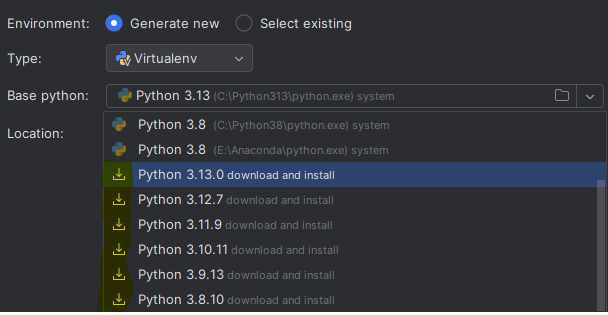
  • Either use an existing interpreter or click Add Interpreter
  • Recommended: Create a virtual environment for project isolation

Step 3: Configure Virtual Environment (Optional but Recommended)

Virtual environments help keep dependencies clean and manageable.

If you’re creating a new interpreter:

  • Choose New Environment using Virtualenv
  • Set the base interpreter (usually your system Python)
  • If none is installed, the dropdown will display a download icon like so:

  • PyCharm will automatically configure the environment

Now you have an isolated workspace—perfect for experimenting!

Step 4: Create Your Python File

Now let’s add some code:

  1. Right-click the project folder in the left panel
  2. Go to New → Python File
  3. Name your file (e.g., main.py) and hit Enter
  4. Start coding!

print("Hello, PyCharm!")

Click the green play button ▶️ to run your script.